Block Out Level 20 Walkthroughs & Guide
Block Out Level 20 introduces the Shutter: a panel with a number that covers the top of the board. Clear blocks to unlock it and reveal what is underneath. This level has too many moves to list one by one, so follow the video above from 10:31.
Step 1. Check the Gates
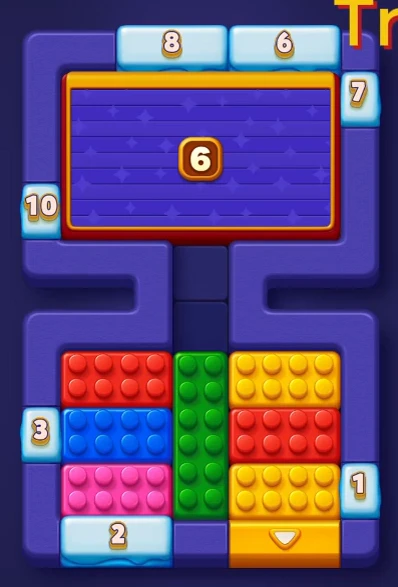
At the start the shutter shows 6. The gates on the top edge show 8 and 6, the gate on the right edge shows 7, the gate on the left edge shows 10 and the gates on the bottom edge show 3, 2 and 1. The yellow gate on the bottom edge is open.
Step 2. Watch the Numbers Count Down
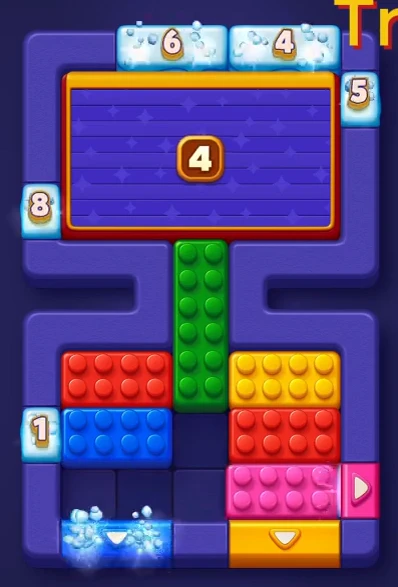
The shutter now shows 4. A pink gate is open on the right edge.
Step 3. Finish the Board
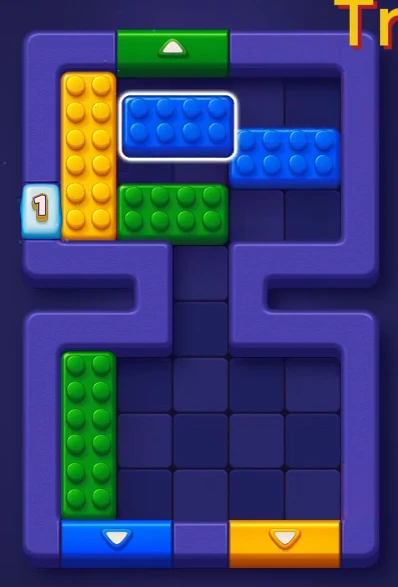
The shutter has opened and the blocks underneath are on the board. Near the end a green gate is open on the top edge and a blue gate and a yellow gate on the bottom edge.
Notes and Precautions
- A block only leaves through a gate of its own color.
- The number on a frozen gate or ice block counts down every time a block leaves the board. At 0 it opens.
- The number on the Shutter counts down as blocks leave the board. At 0 it opens.
Tips and Tricks
- Pause the video at each move and copy it in the same order.
- Moving one block can open or close a path for another, so check before each drag.
Final Scene in Block Out Level 20
When the last block leaves, the board is empty and the level is complete.
Keep going: Level 19.