Block Out Level 30 Walkthroughs & Guide
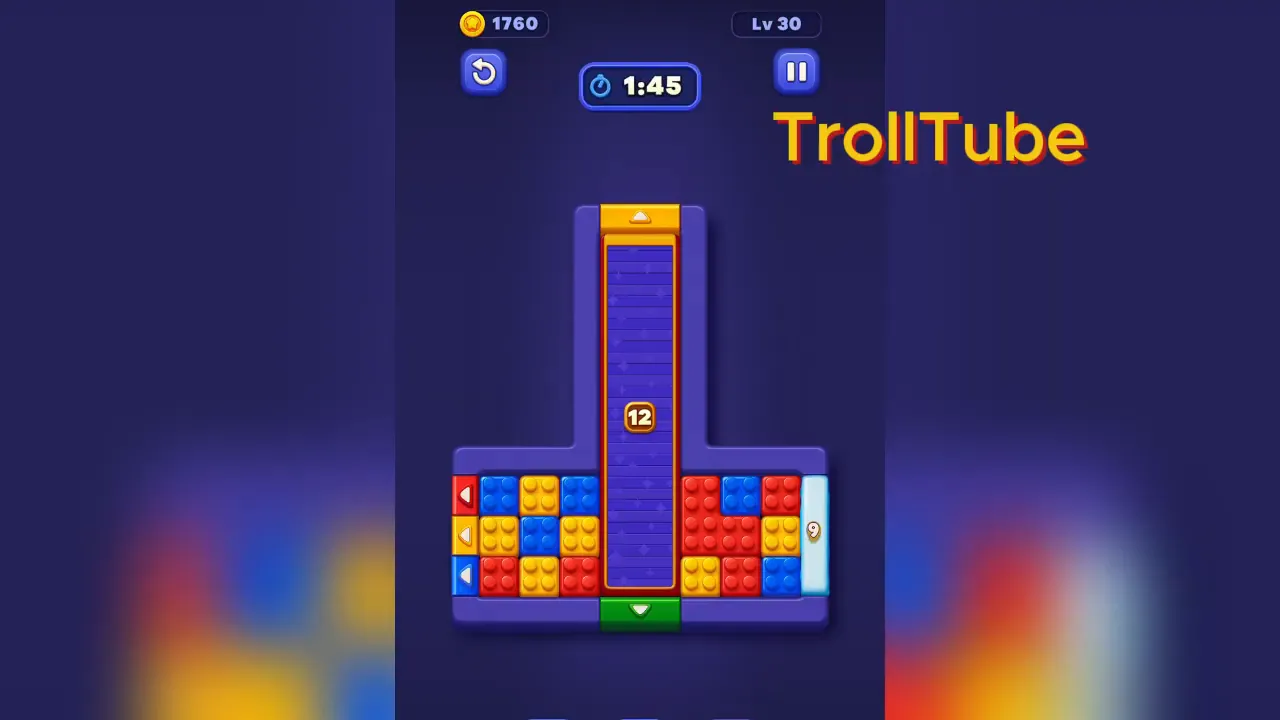
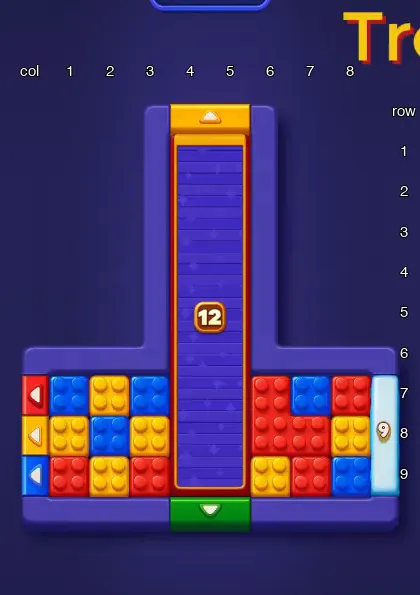
Block Out Level 30 takes 35 drags. Each block is drawn in its color and size; (column, row) is the block's top-left cell (for a shaped block, the top-left corner of the box around it).
Part 1: Step 1
- Drag yellow 1×1 block at (1,8) out through the yellow gate on the left edge.
Part 2: Steps 2–8
- Drag blue 1×1 block at (2,8) to (1,8).
- Drag yellow 1×1 block at (2,7) to (2,8).
- Drag blue 1×1 block at (1,7) to (2,7).
- Drag blue 1×1 block at (1,8) to (1,7).
- Drag yellow 1×1 block at (2,8) out through the yellow gate on the left edge.
- Drag yellow 1×1 block at (3,8) out through the yellow gate on the left edge.
- Drag yellow 1×1 block at (2,9) out through the yellow gate on the left edge.
Part 3: Steps 9–15
- Drag red 1×1 block at (1,9) to (1,8).
- Drag blue 1×1 block at (2,7) out through the blue gate on the left edge.
- Drag blue 1×1 block at (1,7) out through the blue gate on the left edge.
- Drag red 1×1 block at (1,8) out through the red gate on the left edge.
- Drag red 1×1 block at (3,9) out through the red gate on the left edge.
- Drag blue 1×1 block at (3,7) out through the blue gate on the left edge. The red gate on the right edge opens.
- Drag red 1×1 block at (8,7) out through the red gate on the right edge.
Part 4: Steps 16–18
- Drag yellow 1×1 block at (8,8) to (8,7).
- Drag blue 1×1 block at (8,9) to (8,8).
- Drag red 1×1 block at (7,9) out through the red gate on the right edge.
Part 5: Steps 19–22
- Drag blue 1×1 block at (8,8) to (7,9).
- Drag yellow 1×1 block at (8,7) to (8,9).
- Drag blue 1×1 block at (7,7) to (8,7).
- Drag red 3-cell shaped block at (6,7) out through the red gate on the right edge. Shutter 12 opens and the blocks under it appear.
Part 6: Steps 23–24
- Drag red 4-cell shaped block at (4,7) (it was under Shutter 12) to (3,7).
- Drag green 4-cell shaped block at (4,6) (it was under Shutter 12) out through the green gate on the bottom edge.
Part 7: Steps 25–30
- Drag red 4-cell shaped block at (3,7) to (5,6).
- Drag yellow 1×1 block at (6,9) out through the yellow gate on the left edge.
- Drag blue 1×1 block at (7,9) out through the blue gate on the left edge.
- Drag yellow 1×1 block at (8,9) out through the yellow gate on the left edge.
- Drag red 4-cell shaped block at (5,6) out through the red gate on the right edge.
- Drag blue 1×1 block at (8,7) out through the blue gate on the left edge.
Part 8: Steps 31–32
- Drag yellow 2×2 block at (4,4) (it was under Shutter 12) to (5,8).
- Drag green 1×3 block at (4,1) (it was under Shutter 12) out through the green gate on the bottom edge.
Part 9: Steps 33–35
- Drag yellow 2×2 block at (5,8) to (1,7).
- Drag red 1×3 block at (5,1) (it was under Shutter 12) out through the red gate on the right edge.
- Drag yellow 2×2 block at (1,7) out through the yellow gate on the top edge.
Notes and Precautions
- A block only leaves through a gate of its own color.
- The number on a frozen gate, a Shutter or an ice block counts down every time a block leaves the board. At 0 it opens.
- At the start the Shutter shows 12. The red gate on the right edge shows 9. Open at the start: the red gate on the left edge, the blue gate on the left edge, the yellow gate on the left edge, the green gate on the bottom edge, the yellow gate on the top edge.
- A block marked "(it was under Shutter N)" appeared when that Shutter opened.
- A Layer Block leaves in two parts. The outer layer comes off at its gate and the block inside stays next to the gate, so it needs a second drag.
- Ice blocks do not count down while a Shutter covers them. They start counting when the Shutter opens.
Tips and Tricks
- Do the steps in order. Each part ends when a block leaves the board.
- If a block is not where a step says, check the steps before it.
- The parts that end in a Shutter opening are a good place to check that your board matches.
Final Scene in Block Out Level 30
When the last block leaves, the board is empty and the level is complete.